gamingwize_logo_HD
  • News
  • Roblox
  • Fortnite
  • Call of Duty
  • Minecraft
  • Game Codes
  • Puzzles
  • GTA
  • More
    • About Us
    • Editorial Guidelines
    • Contact Us
    • Terms and Conditions
    • Disclosure
    • Cookie Policy
Reading: Roblox Abyss Codes (May 2026)
Share
Font ResizerAa
GamingWizeGamingWize
  • Adventure
  • Call of Duty
  • Fortnite
  • Game Codes
  • Grand Theft Auto
  • Minecraft
  • Puzzles
  • Roblox
Search
  • Home
  • Categories
  • Bookmarks
  • More Foxiz
    • Sitemap
Follow US
© 2026 By gamingwize. All Rights Reserved.

Home » Roblox » Roblox Abyss Codes (May 2026)

Roblox

Roblox Abyss Codes (May 2026)

Swetabh Shekhar
Last updated: May 1, 2026 1:01 am
Swetabh Shekhar
Share
4 Min Read
Abyss game

Update: Added new Abyss codes on March 22, 2026

If you’re looking for the latest Abyss codes, you’re in the right place. While Roblox is packed with fishing simulators, Abyss stands out by mixing underwater exploration with action. Instead of casting a line, you dive deep and use weapons to capture unique sea creatures.

To progress faster, you’ll need rewards like spins, Star Shards, Oxygen Pods, and more. That’s where these working Abyss codes come in. Redeem them to grab free items and make your journey much easier.

All Working Abyss Codes

  • SPORE: 400 Shards (NEW)
  • SORRYDELAY: 200 Shards (NEW)
  • FISHPOND: 500 Shards and 2x Octopus Feed
  • MONKE: 200 Shards and 1 Strength Potion
  • LOVE: 10x Valentines Ticket and 1 Love Potion

Expired Abyss Codes

BUGFIX01, RELEASE

Dark atmospheres and high-stakes battles create some of Roblox’s most gripping experiences. Hunt for glory with Culling Grounds codes, fight for your life using Survive the Apocalypse codes, or craft your way to dominance with The Forge codes. Unleash curse techniques with Jujutsu Infinite rewards.

How to Redeem Abyss Codes

Redeeming Roblox Abyss codes is quick and easy. Just follow these steps:

  1. Launch Abyss on the Roblox app.
  2. Click the Gear icon on the left side of the screen.
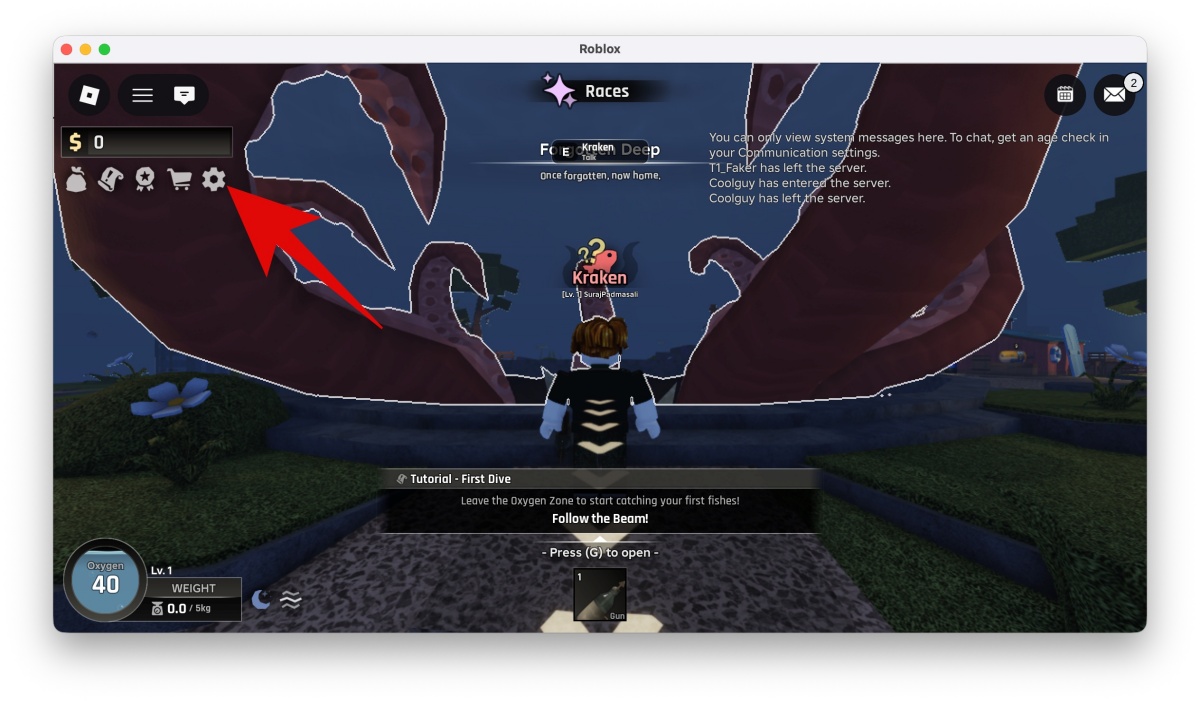
    Click the Gear icon on the left side of the screen
  3. Enter a working code in the “Enter Code” field.
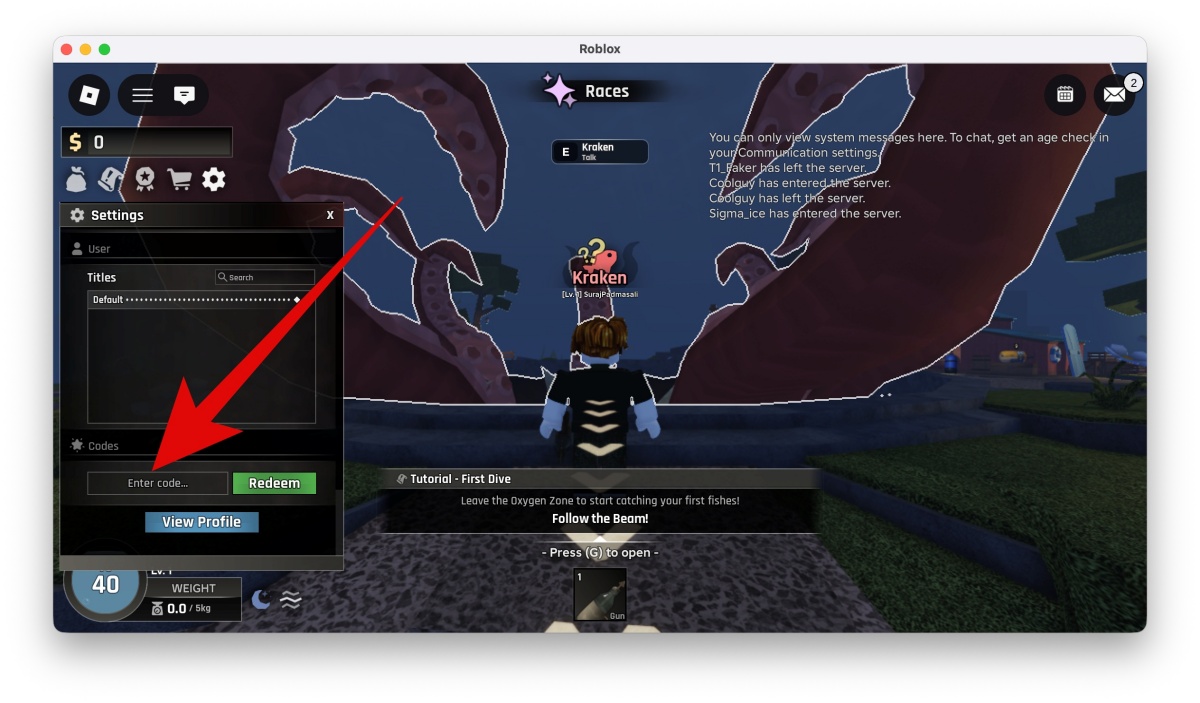
    Enter a working code in the “Enter Code” field
  4. Click Redeem to claim your rewards.

Keep in mind that some active codes for Abyss may require you to reach a certain level or complete the tutorial first.

How to Get More Abyss Codes

The easiest way to stay updated with new codes for Abyss is to bookmark this page. We regularly track and update the latest working Abyss codes, so you don’t miss out. You can also join the official Abyss Discord server. Developers often share codes in the abyss-codes channel, along with game updates and occasional bonus rewards.

Why Are My Abyss Codes Not Working?

If your Roblox Abyss codes aren’t working, here are a few common reasons:

  • Typos: Even a small mistake can make a code invalid. Copy and paste directly to avoid errors.
  • Expired codes: Some Abyss codes only work for a limited time
  • Server delay: After updates, servers may take a few minutes to recognize new codes.

Requirements not met: Certain codes may require you to reach a specific level.

What are Abyss codes used for?

Abyss codes give you free rewards like spins, Star Shards, Oxygen Pods, and other useful items that help you progress faster in the game.

How often are new codes for Abyss released?

Developers usually release new codes for Abyss during updates, events, or milestones. It’s a good idea to check regularly for the latest working codes.

Why do some Abyss Roblox codes expire?

Most Abyss Roblox codes are time-limited. Once they expire, they stop working, so it’s best to redeem them as soon as possible.

TAGGED:Roblox Code
Share This Article
Facebook Email Print
BySwetabh Shekhar
Follow:
Swetabh Shekhar is a gaming journalist at The SportsRush with a Master’s degree in Mass Communication. He has been playing video games since childhood and has seen the gaming industry evolve firsthand across PC, console, and online platforms. His coverage spans major franchises such as GTA, Assassin’s Creed, Call of Duty, Prince of Persia, and The Walking Dead. He also closely follows Roblox, with a strong interest in its evolving games, frequent updates, and creator driven ecosystem. Outside of gaming, Swetabh is passionate about fitness and spends his free time reading books on finance.
Leave a Comment Leave a Comment

Leave a Reply Cancel reply

Your email address will not be published. Required fields are marked *

Trending Stories
Today Letroso Answers
Puzzles

Letroso Answers Today (May 20, 2026) – Complete Answer History

May 4, 2026
NYT Connections Answer
Puzzles

Today’s NYT Connections Answer for May 21 (Puzzle #1158)

May 4, 2026
NYT Wordle Answer and Hints
Puzzles

Today’s NYT Wordle Answer and Hints for May 21 (Puzzle #1797)

May 4, 2026
Today NYT Strands Answer and Hints
Puzzles

Today’s NYT Strands Answer and Hints for May 21 (Game #809)

May 4, 2026
Today's NYT Pips Answers
Puzzles

Today’s NYT Pips Answers for May 21 (Easy, Medium, Hard)

May 4, 2026
Today's NYT Sudoku Answers
Puzzles

Today’s NYT Sudoku Answers for May 20 (Easy, Medium, Hard)

May 4, 2026

You Might Also Like

Uma Racing Game
Roblox

Roblox Uma Racing Codes (May 2026)

March 27, 2026
Black Grimoire Codes
Roblox

Black Grimoire Codes (May 2026)

April 10, 2026
Roblox

Anime Fighting Simulator Endless Codes (May 2026)

March 20, 2026
Shovel It Game
Roblox

Shovel It Codes (May 2026)

March 20, 2026
gamingwize_logo_HD

GamingWize delivers daily gaming news, verified codes and in-depth guides across Roblox, Fortnite, Call of Duty, Minecraft, and more. Built by gamers, written for gamers so you can stay informed and stay ahead.

Categories
  • Roblox
  • Fortnite
  • Call of Duty
  • Puzzles
  • Minecraft
  • Grand Theft Auto
Quick Links
  • About Us
  • Contact Us
  • Cookie Policy
  • Disclosure
  • Editorial Guidelines
  • Privacy Policy
  • Terms and Conditions
Follow US on Social Media
X-twitter Linkedin Discord
@ 2026 By GamingWize
Welcome Back!

Sign in to your account

Username or Email Address
Password

Lost your password?